In the Report dialog, assign descriptive and unique names to the data that you want to use in the report. This will make it easier for you to find the variables in the Report Designer.
Creating customized variable groups
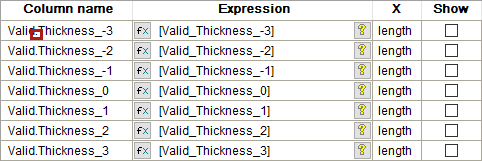
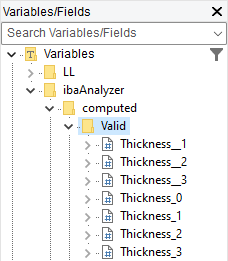
You can create groups for the variables in the Report Designer based on the names of the data in the Report dialog. If you use a period "." in the name, the characters before the period form the folder name, and the characters after the period form the variable name.
In the example, the name "Valid.Thickness" corresponds to the "Valid" folder in the Variables/Fields list of the Report Designer, which contains the individual variables.
|
Entry in the dialog Report of ibaAnalyzer |
Structure in the Report Designer |
 |
 |
This applies to all data that originates from ibaAnalyzer and is used in Report Designer.