If multiple files are opened and you want to extract several signals from several files, it is likely that some channels have the same ID number. The channels therefore need to be renumbered, otherwise it is not possible to uniquely identify them in the exported media. ibaAnalyzer can perform this renumbering automatically, but issues an alert before extraction if this is necessary.
The channel IDs consist of a module number and a position within the module. ibaAnalyzer uses an internal algorithm to create the channel IDs. For this reason, the values are also not directly recognizable during renumbering in the database column.
The Renumbering tab allows the specification of an offset to the module numbers for each file, hence enabling the user to prevent ID collisions and avoid automatic renumbering.
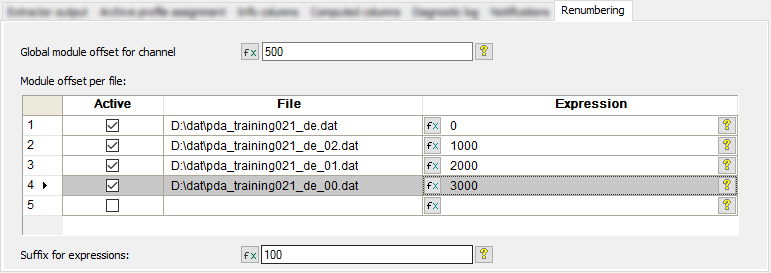
Global module offset for channel numbering
This number is added to DAT file channel numbers.
Active column
Only active files obtain a channel offset. Extraction of channels in inactive files results in a notification.
File column
The open DAT files are automatically listed in this column.
Expression column
The offset for each DAT file is entered in this field.
Note |
|
|---|---|
 |
The original and offset channel numbers are not visible in the database. They can only be seen in ibaAnalyzer after database queries have been carried out, see Analysis of data from databases. |
Suffix for expressions
This applies only to the expressions, names and comments created in ibaAnalyzer. The specified suffix is appended to the expression names.
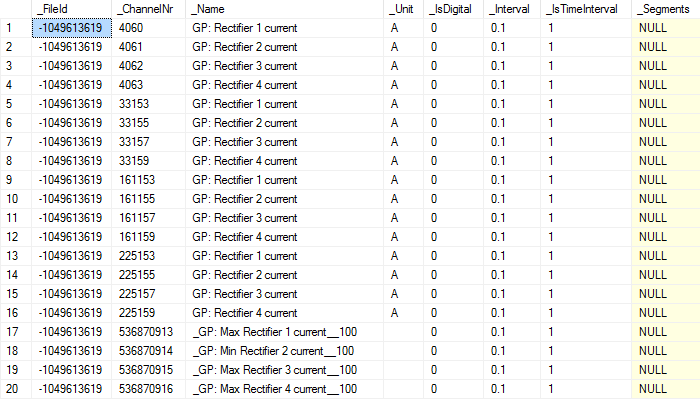
Example of extracted data with renumbering
Extracted data with renumbering (based on the settings above) is displayed in the database as shown in the following figure. ibaAnalyzer uses an internal algorithm to create the channel IDs. For this reason, the values are also not directly recognizable during renumbering in the database column.