In the Archive profile assignment tab, you can configure archive profiles that define the storage interval (timebased or lengthbased). You can then assign the profile to the signals for extraction. You can configure more than one profile, but you can only assign one profile to a signal.
To create an archive profile, at least one DAT file must be open for extraction.
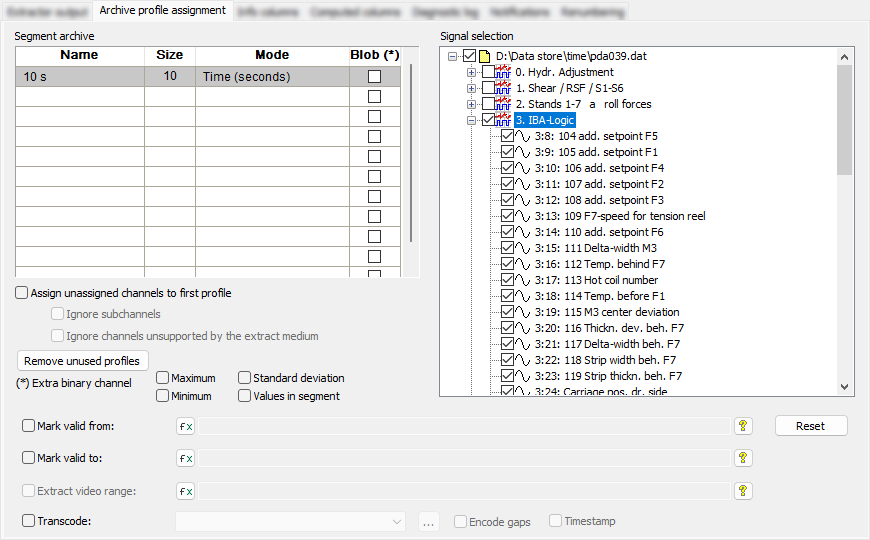
Segment archive
Name column
Select a cell in the Name column and enter a profile name.
It is recommended to use a name which reflects the chosen storage interval for the extracted file, e.g. "10 s" = size (10) × mode (time (seconds)).
Mode and Size columns
Enter a multiplier in the Size column to determine the storage interval for the extracted data e.g. 10 s = "Size (10)" × "Mode (time (seconds))".
Click in the Mode column and select an extraction mode:
-
For the Time and Length modes it is possible to enter a value < 1 to obtain fractions of the unit under Mode. When entering the fraction factor for values < 1, make sure a point is entered instead of a comma as the decimal separator (e.g. "0.5" instead of "0,5").
-
The following modes use the original base of the signal or a multiple of it, so fractions are not useful here. For example, a temperature that was measured every minute does not need to be extracted every 100 ms.
*signal default base: original base, either time or length, depending on the signal type
*signal timebase: original timebase
*signal lengthbase: original lengthbase
*signal time- and lengthbase: original time- and lengthbase; supported only for multi-column format, because at least two segment tables are written.
If the timebase of the recording signal is 1 ms, the 100 ms profile could also be defined as follows: Size = 100 and Mode = *Signal timebase
-
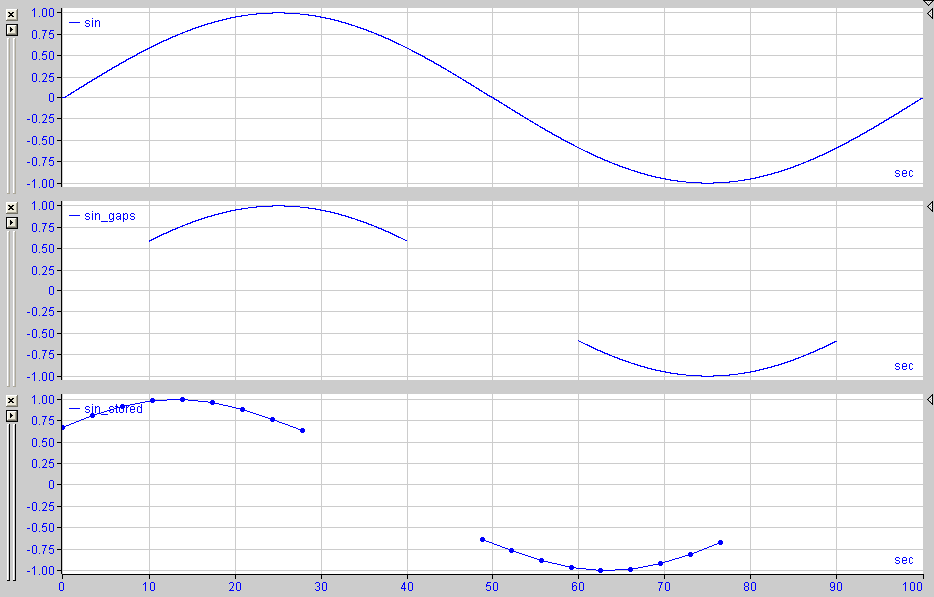
By using the Time segments or Length segments modes it is possible to define a fixed number of equidistant time or length segments. For example, Size = 1 and Mode = Time segments means that only 1 segment value is stored for the whole data channel. If parts of the source signal are invalid, the extracted segments containing the invalid parts are left blank. If the empty segments are at the beginning or end of the signal, they are not transferred to the extracted data. If the empty segments are between valid segments, the extracted data contains corresponding gaps with invalid values.
-
The Time, non-equidistant mode is not supported for extraction into a database and leads to the following error message. This option only exists for extraction into text files.
Note |
|
|---|---|
 |
If you assign signals to a profile that do not match the selected mode, e.g., time signals for the "Length" mode, these signals will not be extracted into the database. |
Blob column
If you enable this option, the data is saved as a Binary Large OBject (BLOB). For additional information, please see Using BLOBs.
Note |
|
|---|---|
|
If BLOBs are used, the statistical values are only accessible by a user-defined decompression program and not by ibaAnalyzer! The Values in segment option is also not available if BLOBs are used. |
Assign unassigned channels to the first profile
If you enable this option, all signals that have not been manually assigned to a profile are automatically extracted with the first profile. However, this automatic assignment is not displayed in the signal assignment. This helps prevent errors in the extraction process if the file structure is modified across different files, e.g., when the DAT file is expanded in ibaPDA.
Ignore subchannels
If you enable this option, subchannels from an HD query are not extracted, e.g. the channels min/max.
Ignore channels unsupported by the extract medium
If you enable this option, channels that the destination file format does not support are not extracted, e.g. ibaCapture synchronization channels for non-iba formats.
<Remove unused profiles>
Use this option to automatically delete profiles that have no signals assigned to them.
Input signals
You have to assign the signals to the created profiles. Select the signals to be included in the extracted data. The extracted signal values are the averages of the source signal values within the selected storage intervals.
When a module node is enabled or disabled, all signals that belong to this module are also enabled or disabled. Individual signals can be enabled or disabled in the open module node. The selected signals are always assigned to the highlighted profile (gray background color). When changing the profile, the associated selected signals also change. You can only assign one profile to a signal.
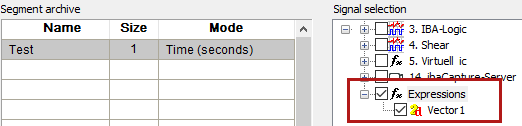
You can extract and query also multidimensional expressions (virtual signals, logical expressions and vectors from a DAT file) from there. A new column _LogicalId (i_LogicalId for Oracle and IBM DB2 databases) then appears in the channel header of the database to show which subchannels belong to the same multidimensional channel.
Note |
|
|---|---|
|
Assigning a length mode to a timebased signal or a time mode to a lengthbased signal will result in an error during extraction. |
Note |
|
|---|---|
|
If the archive profile specifies signals that are not present in the current analysis file, these are listed under Channels currently unavailable.
|

Additional channel information: Maximum, minimum or standard deviation
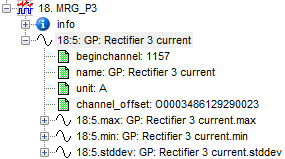
The options for Maximum, Minimum, Standard deviation and Values in segment are only available for the Multi-column schema mode, see Multi-column schema mode. In Standard schema mode these values are automatically extracted into the segment table.
If you enable this option, subchannels are generated, each representing the maximum, minimum, or standard deviation of the source signal values within the selected storage intervals. This option can be helpful for newly recorded signals.
Note |
|
|---|---|
|
If the selected storage interval of the profile is identical to that of the source signals, these values are irrelevant. |
Additional channel information: Values in segment
If you enable this option, the _ValuesInSegment column is created in the database. This column contains the number of data points that are compressed in each segment in the database. This option is only available for the Multi-column schema mode and if the profile is not extracted as BLOB, see above.
Mark valid from/Mark valid to
If you do not want to extract the signal over the full duration, you can define the start and end of the profile range here. To calculate the range from your data, you can use expressions.

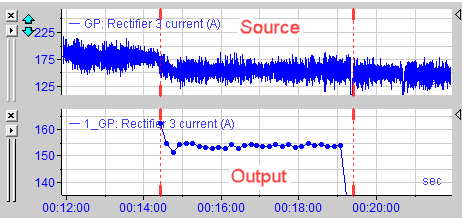
If neither of the two expressions is defined despite the options being enabled, the signal is extracted in full.
If the specified expressions cannot be evaluated, an error message appears during the extraction.
Extract video range/Transcode
These functions are not supported for extraction into a database but only for extraction into files.
<Reset>
Delete all signals from the selected profile.