To connect ibaAnalyzer to a PostgreSQL database, you do not need to make any special settings on the database side.
Note |
|
|---|---|
 |
ibaAnalyzer v8.0.0 or higher no longer supports any database connections via ODBC. Databases that have been configured in older PDO files via ODBC must be converted to the actual database provider in ibaAnalyzer and directly connected to the database. |
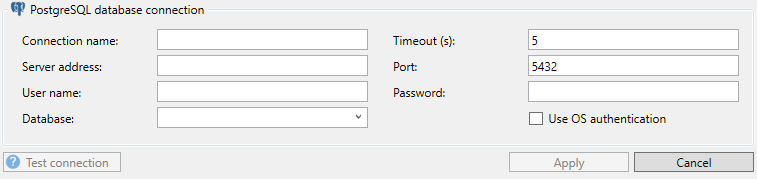
From the Data source drop-down list, select Create database connection. In the Database connection dialog box, select the required database provider under Database type.
To edit an existing connection, select the connection from the Data source drop-down list. Then click on the editing button.
Enter the other settings.
Connection name
This line contains the name of the database connection. The name is automatically formed and entered according to the scheme username@database as soon as you have filled in the fields below. Alternatively, you can enter and overwrite the connection name manually.
Timeout
Here you can specify a value for the timeout in seconds for establishing the connection. If the time set here is exceeded, ibaAnalyzer aborts the connection attempt and displays an error message.
Note that once the connection is made, each command sent to the database has an additional timeout, which can be set by the application that makes use of it. There is no generic configuration for the command timeout.
Server address
Enter the IP address or the host name of the database server.
Port
The DB server communicates via this port. Usually, you can keep the default port 5432. If a different port is required, you can enter this port here.
Username/Password
Enter here the required login data for the database. If uncertain, ask your DB administrator.
These fields are only available if the option OS-Authentication is disabled.
Use OS authentication
If you enable this option, the user account is used under which ibaAnalyzer runs. Usually, this is the system account. Contact your DB administrator to find out if this setting is suitable.
Database
Enter the database here. When you have entered the server address, authentication or username and password. The drop-down list shows all available databases for the connection and you can select one.
<Test connection>
ibaAnalyzer checks the access to the selected database on the set DB server. If the connection is successful, the message includes the version of the database.