Queries can also be directly written in SQL syntax. This option offers full flexibility in the database or application environment used. In the WHERE condition, you can use any table that is accessible via the configured database connection.
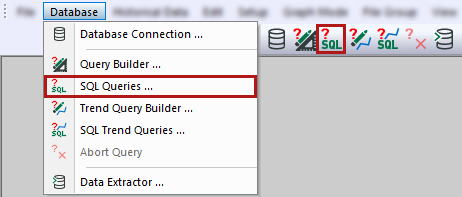
You can open the SQL query either via the Database – SQL queries menu or via the corresponding button in the toolbar.
In the following window, you can configure SQL queries.
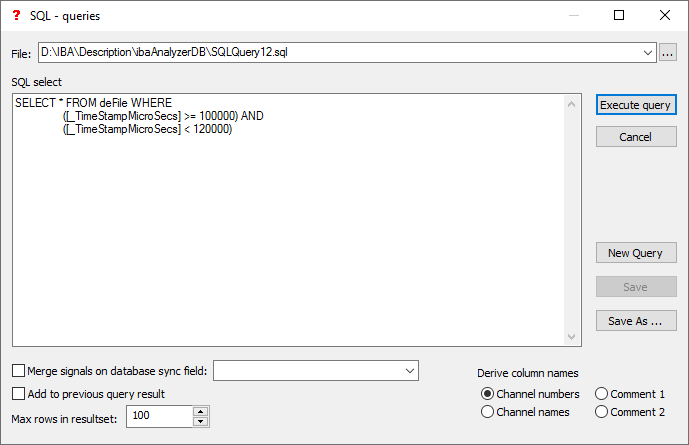
File
If available, select a previously created query file.
SQL select
Enter an SQL text. If an SQL file is open, the text is displayed here and can be edited.
<Save>
Save changes to the currently open query file.
<Save as>
Save as a new query file.
For more information on the following settings, see Query builder:
-
Merge signals on database sync field
-
Add to previous query result
-
Maximum rows in the result set
-
Derive column names
-
<Execute query>
-
<Cancel>
-
<New query>
Note |
|
|---|---|
 |
The SQL query can only use the column names specified by the selected option Derive column names. |
Note |
|
|---|---|
|
The SQL syntax may differ depending on the database provider used. |
Example: Syntax differences
Query of data from the last two days in SQL Server:
SELECT * FROM PDA_File WHERE _Timestamp > (getdate()- 2)
Query of data from the last two days in Oracle syntax:
SELECT * FROM PDA_File WHERE I_Timestamp > (SYSDATE - 2)