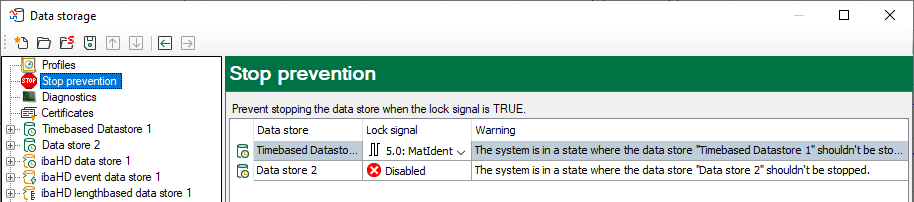
By enabling the “Stop prevention” function you have the possibility to prevent the data storage from being stopped by accident.
Stop prevention only affects only standard and QDR data stores (data files).
You can enable the stop prevention by selecting any digital signal. If attempts to stop the storage occur on an ibaPDA client while the signal is TRUE, a message box pops up asking for confirmation. The data storage will only be stopped if you answer this question with “Yes”. Using this feature you can protect a running data storage with signals from the plant, the process or by an operation.
If stop prevention is enabled, i.e., a lock signal has been assigned, a red STOP icon appears in the stop prevention node. If no lock signal is assigned, the icon is gray.
Lock signal
Click on the drop-down icon in this field and select the desired signal from the signal tree.
All digital signals can be used as lock signal, e. g.
-
Digital input signals from sensors or PLC
-
ibaQPanel inputs
-
Virtual signals
Warning text
You can overwrite or modify the standard text in this field. This helps you to include practical advice, directions or contact data in the warning message.
If the stop prevention is triggered by clicking on the stop trigger button, the warning message pops up immediately.
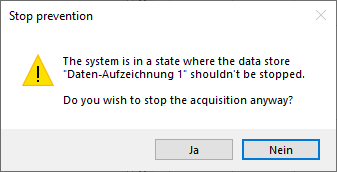
You can only acknowledge this message. If you still want to stop the data storage, you must deactivate the stop prevention by deleting the lock signal. Alternatively, you can stop the acquisition, in which case the same message will also appear. Nevertheless, you then have the option to end the acquisition and thus also the storage.
If the stop prevention is triggered by a change of the data store configuration, the warning message pops up, supplemented by an entry in the validation dialog.

If you click <Yes> at this point, then the storage in question is stopped, whereas the new configuration is applied and the storage is restarted. Meanwhile, the acquisition continues.