The recording profile function primarily serves to reduce data volumes for time- and length-based data stores. Even when the process phases relevant for the recording have been narrowed down with the trigger settings, still a large number of values is generated that can quickly fill up the storage media. Particularly with general long-term data storage, it is not often necessary when using measured values that they will be available at a later point in time at a high-resolution sampling speed, e.g., 1 millisecond. Additionally, the signal type also determines whether it must be recorded at high or low cycle rates. Rapidly changing signals like currents or forces are usually recorded with a smaller time base than slow-changing signals like temperatures.
Since each signal can be individually linked to a recording profile, it is also possible to differently record signals coming from the same module.
All profile types except the non-equidistant recording have the option of a statistical filter. If the signals are acquired much faster than recorded according to the profile setting, you can use the filter to determine which value (actual value, maximum, minimum or average value) should be saved in relation to the values acquired in the recording interval.
For DB/Cloud data stores, the profile is primarily used to match the target database for ID and value columns.
The following figure shows a typical time-based profile.
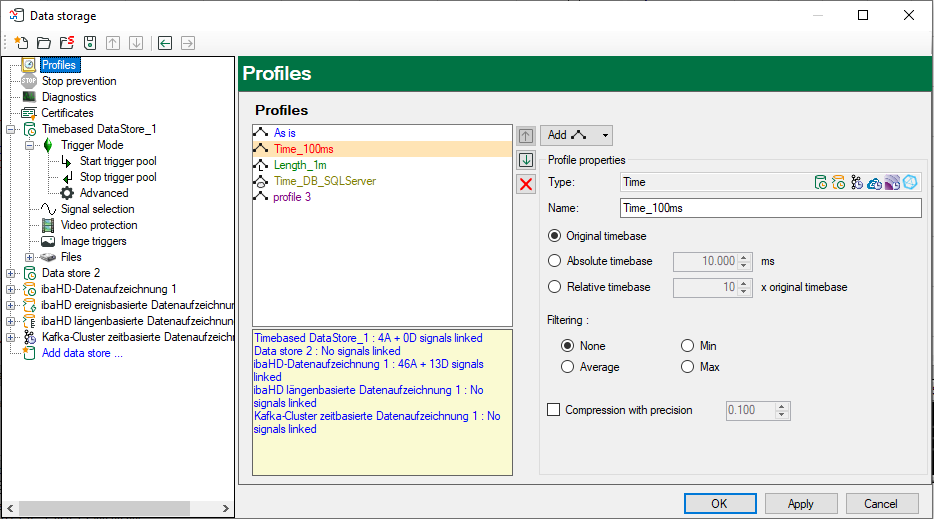
Click on the Profiles branch in the tree structure at the left of the configuration dialog. In the right-hand part, you can now see a list of available profiles (at least "As is"). Next to the list, you will find more information on the profile you have selected in the list. Below the list, you see for which data storage the selected profile is used and how many signals are assigned to it.
Any number of storage profiles can be defined. Each profile is stored with a unique name assigned by the user, so that the allocation of profiles to the signals is very clear and comprehensible.