Use this profile if you want to write the measured data in supported databases by means of a DB/cloud time-based data store.
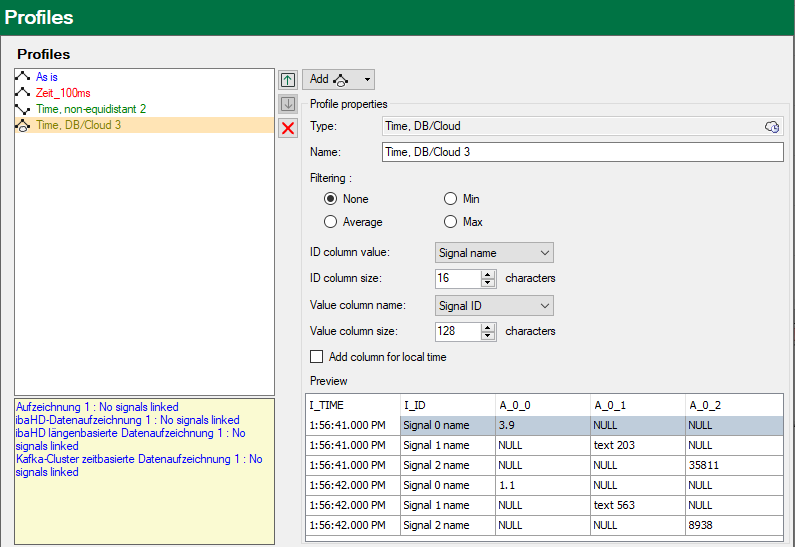
Profile properties
Type
Display of the type with the appropriate types of data storage (symbols)
Name
Enter an unambiguous and understandable name here.
Filtering
Select the signal value to be stored with reference to the time base set above.
-
None: The actual value will be stored
-
Average: The arithmetic average of all measured values, which were acquired in the interval (according to the time base, such as 10 ms or 100 ms) is formed and saved.
-
Min: Only the smallest value of all samples measured within the defined interval will be stored.
-
Max: Only the largest measured value of all measured values acquired within the defined interval will be stored.
Value of ID column, size of ID column
A table can also have an ID column, which can be used as the key. This column is denominated ID in ibaPDA. You can set whether you want to use such a column or not. If you want to use such a column, you can configure which value should be added. You can choose from the following:
-
None: No ID column is used
-
Fixed: A fixed text is written in the ID column. This can, for example, be used as identification of the ibaPDA system if several ibaPDA systems write in one table.
-
Text signal: The value of a text signal
-
Signal ID: The ID of the signal to which this profile is assigned, e.g. [10:2]
-
Signal name: The name of the signal to which this profile is assigned
-
Signal comment 1: The first comment of the signal to which this profile is assigned
-
Signal comment 2: The second comment of the signal to which this profile is assigned
The ID column is created with the data type NVARCHAR(x), whereby x is the size that was set in the field Size of the ID column.
Name of the value column, size of the value column
Use this option to determine the values column in which the value of each signal assigned to this profile is written. Available for selection are:
-
Fixed: A fixed column name. This means that the data of each signal is written in a separate line. This also means that you should use an ID column to be able to determine the signal to which the data belongs.
-
Signal ID: The column name is derived from the signal ID.
-
Signal name: The column name is derived from the signal name.
-
Signal comment 1: The column name is derived from the first comment of the signal.
-
Signal comment 2: The column name is derived from the second comment of the signal.
If you do not choose “fixed,” then a line will receive the data from several signals. The notation is more efficient, but not mandatory.
If you want to write text signals in the table, you must specify the size in number of characters.
Add column for local time
The default time column I_TIME shows the UTC time. If you enable this option a column showing the local time will be added.
Preview
The preview shows which columns will be created based on the ID and value columns settings.
Other documentation |
|
|---|---|
 |
You will find more information about DB/cloud data storage in the respective manual for the product, such as ibaPDA-Data-Store-SQL-Server-xxxx. |