VarDelay('Expression','Delay', 'MaxDelay=30*')
Arguments
|
'Expression' |
input signal |
|
'Delay' |
Time delay in seconds |
|
'MaxDelay*' |
Optional parameter (default = 30) to determine the maximum delay permitted in seconds |
Parameters ending with * are only evaluated once at the start of the acquisition.
Description
This function delays the 'Expression' signal by the 'Delay' time. In contrast to the Delay function, the delay time may change over time. 'MaxDelay' specifies the maximum delay permitted and is preset to 30 s by default.
Example
Temporally variable delay of a signal reaching the maximum permitted delay
Solution
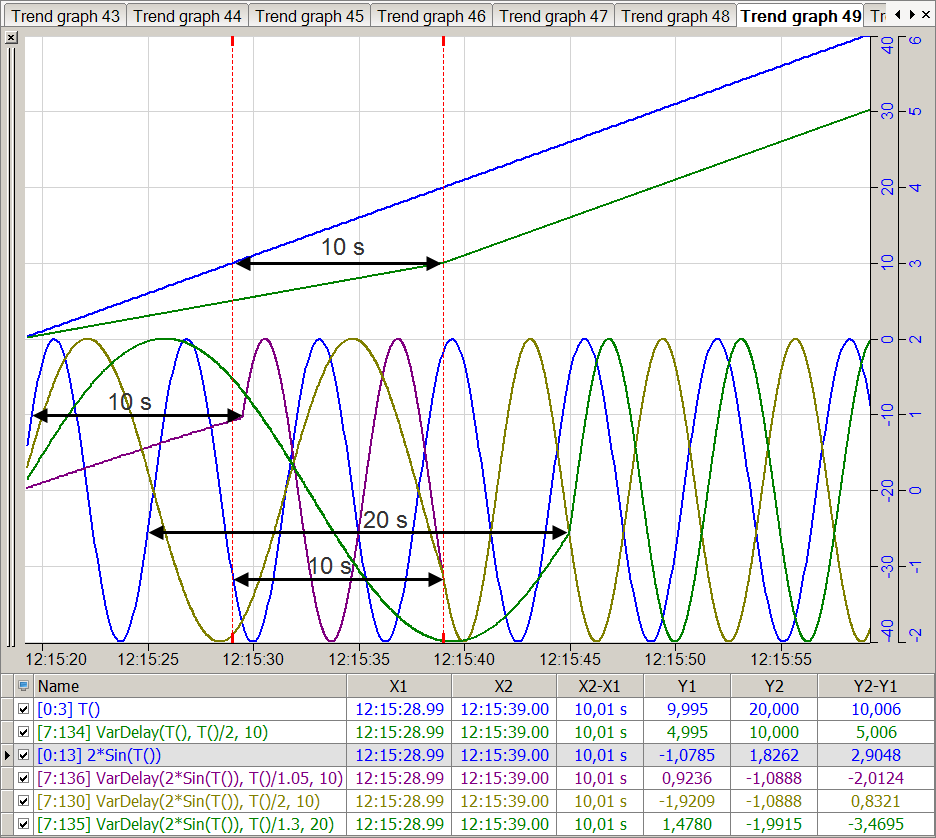
The time function T() is used as the variable delay. This and a sine signal are set to this variable delay and the resulting curves are recorded.
As soon as the maximum delay is reached, the delay remains constant whereas the resulting curves only represent the shifted output signals.
In the figure below the top part shows the delay of the time signal by a variable shift with a maximum value of 10 seconds. The bottom part shows the delay of a sinusoidal function with three different delay and maximum delay values.
Tip |
|
|---|---|
 |
Negative values for 'Delay' do not produce an error message but are treated as 0, i.e. there is no delay. |