ConvertFromText('Expression', 'DecimalPoint*=0', 'Begin=0', 'End'=-1 (end of text)', 'Base*=10', 'Bitsize*=32')
Arguments
|
'Expression' |
Name of the text signal |
|
|
'DecimalSeparator*' |
Decimal point |
|
|
DecimalSeparator = 0 DecimalSeparator = 1 |
Period Comma |
|
|
'Begin' |
Index of the first character of the desired text, default = 0; if <0, it will be internally converted to 0. |
|
|
'End' |
Index of the first character of the desired text, default = -1 (end of the text) |
|
|
'Base*' |
Expected numerical base of the number in the text |
|
|
'Base=2' 'Base=8' 'Base=10' (default) 'Base=16' |
binary octal decimal hexadecimal |
|
|
'Bitsize*' |
Number of bits, the parsed number should have |
Typ. values: 32 (default), 64, 16, 8 |
Parameters ending with * are only evaluated once at the start of the acquisition.
Description
The function parses a floating-point number from the text and delivers the numeric value as an decimal number. 0 is output if there is no number in the first position of the range defined by the 'Begin' and 'End' arguments. Exception: if there are only spaces present up to the first numeric character. Otherwise the text is read up to the first non-numerical position or maximum to the 'end'. Leading zeros before a number must not to be interrupted by spaces or non-numerical characters.
By the argument 'DecimalSeparator' you determine the decimal point. This is only relevant, if the number in the text is already a floating-point number ('Base=10'). 'DecimalSeparator' is ignored, if the argument 'Base' is not 10.
The 'Base' argument determines the numerical base expected in the text input. Possible values are 2 (binary), 8 (octal), 10 (decimal) and 16 (hexadecimal). While parsing the text, the function interprets the number in the text as a number with the numerical base 'Base' and converts it to the corresponding decimal number. If the number in the text is a decimal number you can omit the 'Base' argument. If, for instance, the number in the text is a hexadecimal number, then enter 16 for 'Base'. The result for the number FF in the text will be 255.
The “Bitsize” argument is only relevant if the 'Base' argument is set to something different than 10. It determines how many bits the parsed number should have. This is necessary for correctly parsing numbers that are represented in two’s complement. For example, parsing the number 0xFFFF results in -1 when using 'Bitsize=16', but it results in 65535 when a larger Bitsize (e.g. 32) is used.
ConvertFromText with a 'Base' value different than 10 internally always works on 64-bit signed integers, so signal values larger than 263 – 1 are not correctly converted. Also note, that 'Bitsize' is limited to 64 and consequently only 64 bit signed integers can be parsed.
Example 1: Converting a decimal number
Reading in a defined text
Solution
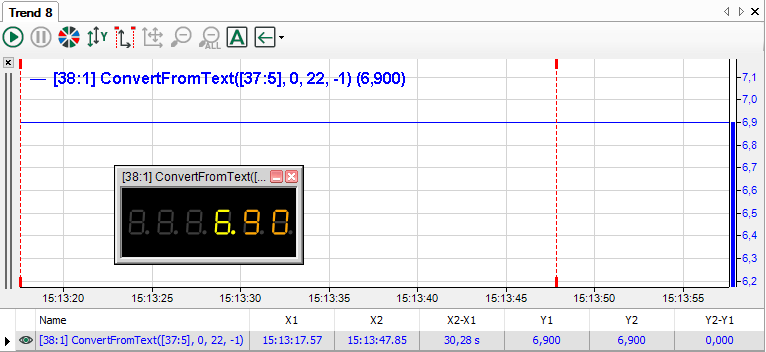
The function is: ConvertFrom Text('Text', 0,22,-1)
The content of the text signal is: Voltage target value: 6.9 V
The voltage value starts with position 22. -1 is used as the end index so that values with more preceding and/or following commas can also be acquired.
Example 2: Converting with numerical base
Parsing and converting a number from a text, taking into consideration the numerical base
The text line in the following examples contains a number beginning at position 17, which is converted by the function ConvertFromText, considering different numerical bases. The right column shows the syntax of the function. The resulting values (highlighted in green) are always decimal numbers.

The binary conversion has no result, because the numeric characters 2 and 5 do not exist in the binary system.

The binary conversion shows a result, because the numerical characters 0 and 1 do exist in the binary system.

The conversion for binary, octal and decimal systems shows no result because the character F does not exist in these numerical systems.