In the 32Mbit Flex mode, the number of signals can be set flexibly in ibaPDA.
-
Start ibaPDA and open the I/O Manager.
-
In the signal tree (left), mark the link of the ibaFOB-D card to which ibaLink-VME is connected. Right-click the link to open a sub-menu. Select "Autodetect".

ibaPDA detects the component automatically and displays it in the signal tree.

-
You can also add the component manually. Right-click on the link of the ibaFOB-D card to which the component should be connected and select "Add module" and "ibaLink-VME" from the list displayed.
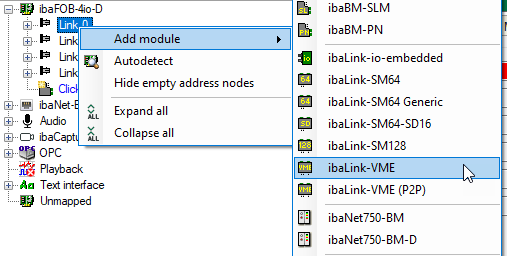
The component is then displayed in the signal tree.
-
Hold the mouse button down and drag the component to the address (link 1 to 15 under the device), which is set with the S1 rotary switch on the device. Position 1 to F corresponds to address 1 to 15.
-
Configure the ibaLink-VME module in the I/O Manager.