If the DGM200P or DGM200E option (each without HPCi request) is unlocked in the dongle, the HPCi Lite tab in theAddress book node in the General register is displayed. If you are using an HPCi Request license, this tab is not visible.
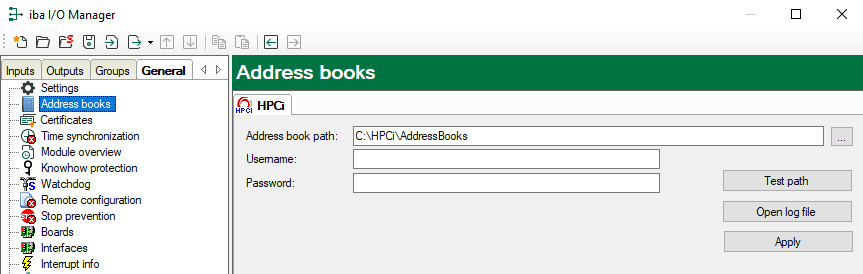
Important information for the HPCi Lite function should be entered here.
Addressbook path
Enter the complete path name where the toc.ini configuration file is stored. You can get a sample file of toc.ini from iba or from GE Energy Power Conversion (ex. Converteam). The program CCM32 (Coordination
Channel Manager), version 2.17a or higher, reads and supplements this file.
The actual address book will be generated by the CCM in the same directory.
User name and password
If the toc.ini file is not stored on the local drive of the ibaPDA computer but on a network drive, then here you have to enter the credentials (user
name and password) for the remote computer. This user must be registered on the remote
computer with appropriate rights for reading data.
<Test path>
Click on this button in order to check the accessibility of the specified path.
<Open log file>
Mouse click this button in order to open a system log file which shows all relevant activities and events regarding the connection to the HPCi systems.
<Apply>
If changes were made in this dialog, they must be applied via this button. The changes will be applied and the driver restarted.