If ibaDatCoordinator is operated via a service account, this account lacks the necessary permission to start the ibaAnalyzer application.
This appears as the following error in the ibaDatCoordinator log:
Failed to create an instance of ibaAnalyzer: Retrieving the COM class factory for component with CLSID {C4B00861-0324-11D3-A677-000000000000} failed due to the following error: 80070005 Access is denied. (Exception from HRESULT: 0x80070005 (E_ACCESSDENIED)).
To eliminate this error, the service account must be allowed to start ibaAnalyzer by means of the COM component. For this purpose, various authorizations must be made in the DCOM configuration. To do so, proceed as follows:
-
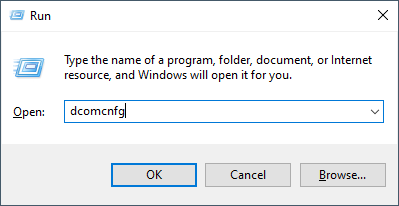
Open the component services by pressing <Windows>+<R>, typing "dcomcnfg" and selecting the DCOM configuration in the tree view.
-
As a normal user, you will still need to initiate authorization in order to modify the settings.

-
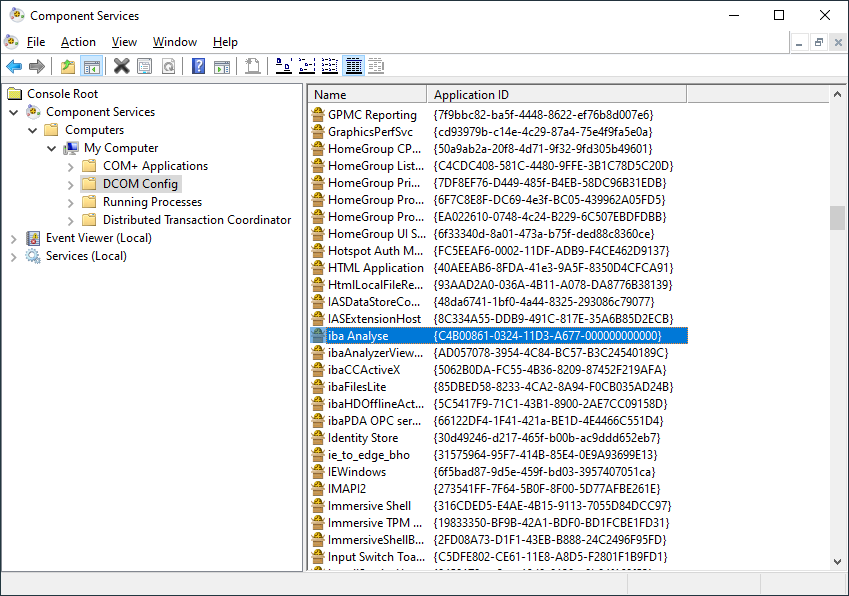
Switch to the detailed view.
-
Select the "iba Analyse" element and match the application ID with the CLSID from the error message.
-
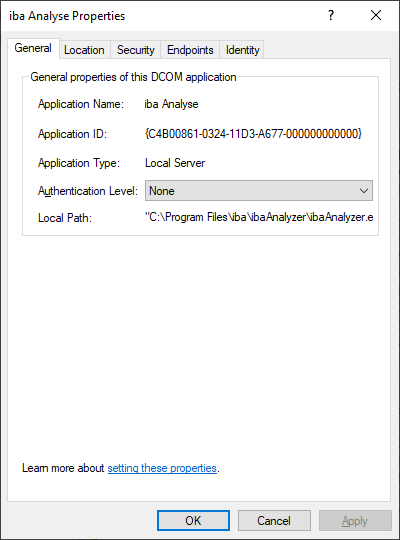
Open the properties for the component.
-
In the General tab, set the Authentication level from "Default" to "None".
-
Switch to the Security tab.
-
Select the “Customize” option for Launch and Activation Permissions and Access Permissions.

-
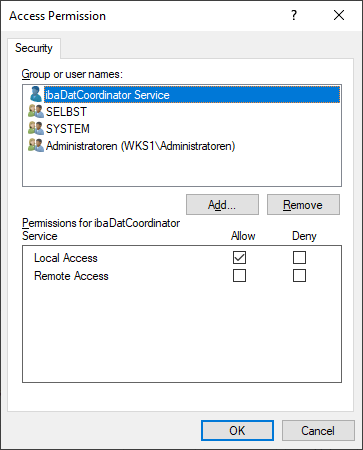
Add the new service account to each of the two permission types via <Edit...> and grant it the following permissions:
-
Launch and Activation Permissions
-
Local Launch
-
Local Activation

-
-
Access Permission
-
Local Access
-
-