Certificates are used every day, often without the user's knowledge. For example when visiting a website, e.g. https://www.iba-ag.com, the connection is secured by means of certificates.
The certificates themselves contain certain information about the owner (e.g., company, name, e-mail address, etc.) as well as two other components: a private key that is kept secret and a public key that everyone is allowed to know.
In order to avoid the "chicken and egg problem" when it comes to trusting certificates, external certificate authorities operate on the principle of "blind trust". To ensure the proper functioning of this "blind trust", the certificates provided by the external certificate authorities are integrated into the operating system and the web browser.
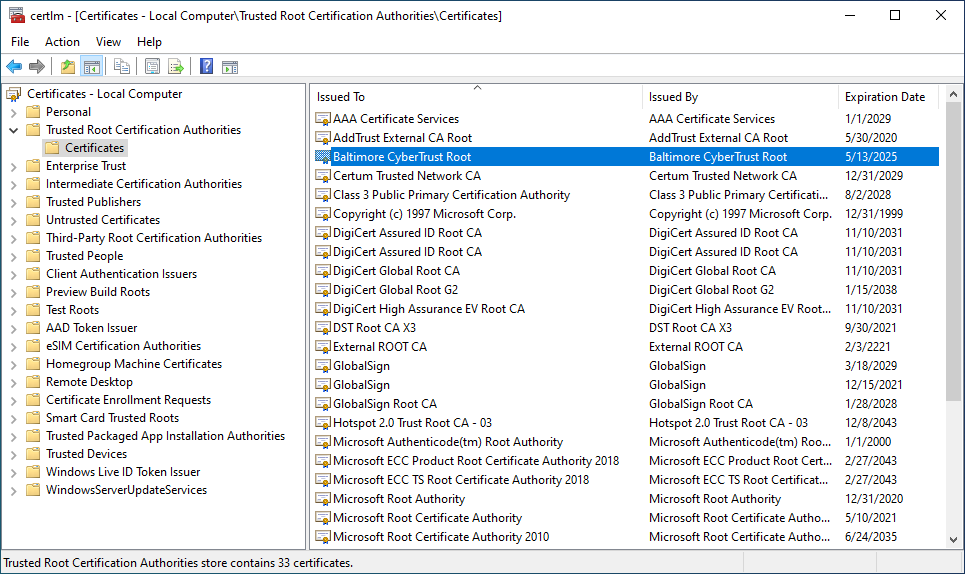
Fig. Windows certificate store
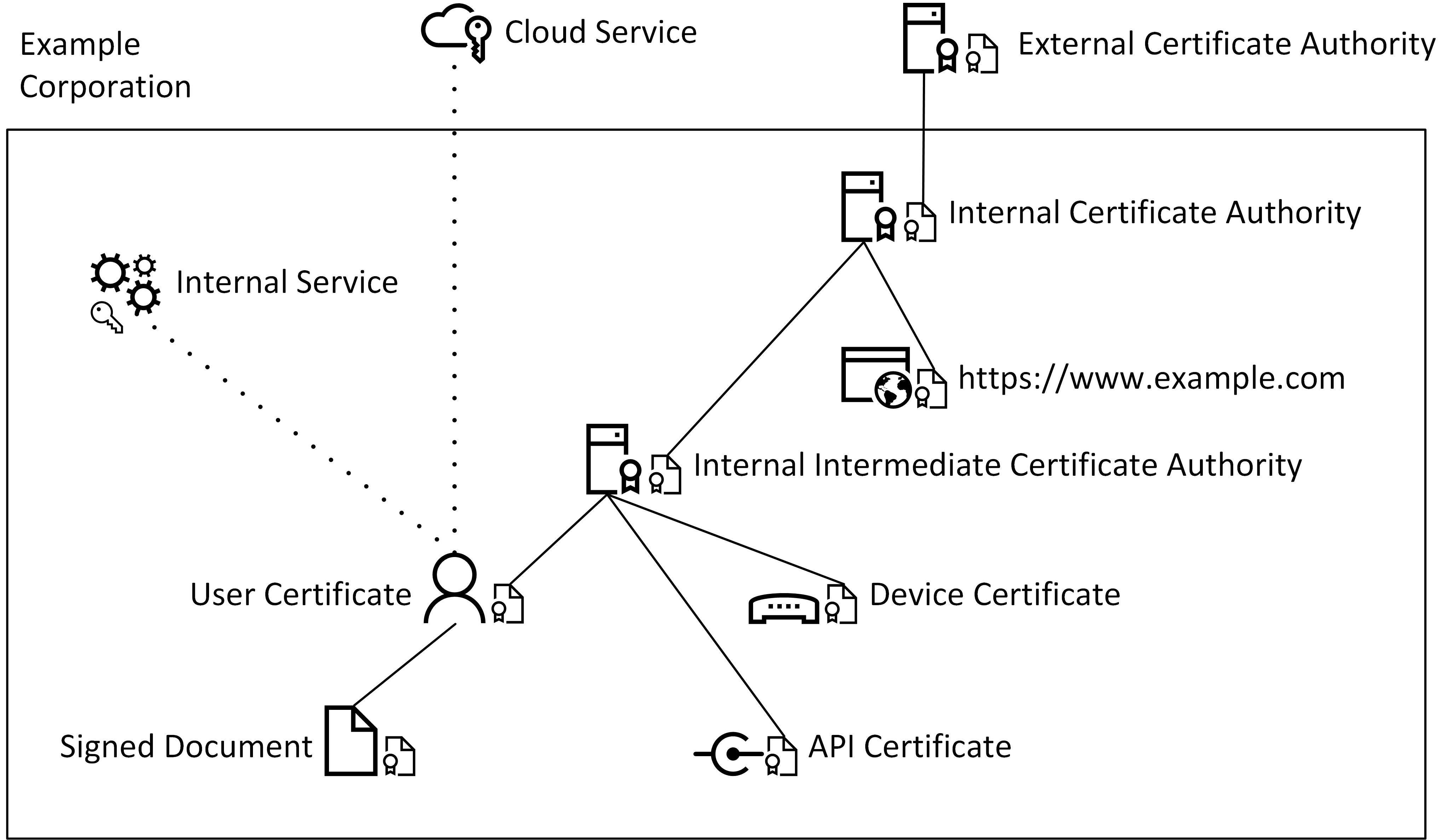
Fig. Example architecture of the Excorp domain with certificate authorities
Example procedure for the internal certificate authority
|
1 |
|
Internal certificate authority |
|
2 |
|
Creates a private key during the initial setup |
|
3 |
|
Creates a certificate request (CSR) and sends it to the external authority |
|
4 |
|
External certificate authority |
|
5 |
|
Signs the request (CSR) and issues the certificate (CRT) |
|
6 |
|
Signed certificate (CRT) is saved by the internal certificate authority |
|
7 |
|
Internal certificate authority with valid certificate |



During initial setup, the internal certificate authority either has no certificate or only a self-signed one. In order for others to trust this authority, it first issues a certificate request. This is then verified and signed by the external certificate authority. The resulting certificate for the internal authority is thus signed by the external authority. This creates a certification path from the external to the internal authority. Since the external authority is blindly trusted and it has signed the internal authority, the latter is also trusted. If the internal authority in turn issues a certificate, e.g., for a website belonging to the organization, this certificate is also trusted based on the same certification path.
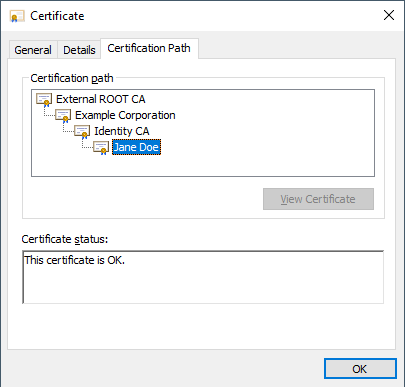
Fig. Certification path
As can be seen, the certificate for Jane Doe is trusted because of the end-to-end certification path, since the intermediate certificate authority (Identity CA) was signed by the internal certificate authority.
Content of a CSR (decoded)
Certificate Request:
Data:
Version: 1 (0x0)
Subject: C = US, ST = Georgia, L = Alpharetta,
O = Example Corporation, CN = Jane Doe
Subject Public Key Info:
Public Key Algorithm: rsaEncryption
RSA Public-Key: (2048 bit)
Modulus:
00:af:71:5e:f6:08:f2:3c:67:ee:ba:cb:b7:03:c2:
...
Exponent: 65537 (0x10001)
Attributes:
a0:00
Signature Algorithm: sha256WithRSAEncryption
1b:22:14:81:55:38:2a:7e:4c:f6:82:84:72:35:e3:23:d6:25:
...
In addition to the public key, the CSR also contains information about the applicant.
-
Country (C): Country code
-
State (ST): Federal state/province
-
Locality (L): Town/City
-
Organization (O): Company
-
Common Name (CN): Name of the applicant or FQDN
Optional:
-
Organizational Unit (OU): Department name within the company
-
emailAddress: Contact address
Content of a signed certificate (decoded):
Certificate:
Data:
Version: 3 (0x2)
Serial Number:
7d:fd:25:09:b6:5b:57:63:0f:21:0d:e6:14:79:93:47:4c:0f:da:ee
Signature Algorithm: sha256WithRSAEncryption
Issuer: CN = Identity CA, ST = Bavaria, C = DE,
emailAddress = it@excorp.local, O = Identity CA,
OU = IT-Department, L = Fuerth
Validity
Not Before: Mar 23 16:49:31 2021 GMT
Not After: Mar 23 16:49:31 2023 GMT
Subject: C = US, ST = Georgia, L = Alpharetta,
O = Example Corporation, CN = Jane Doe
Subject Public Key Info:
Public Key Algorithm: rsaEncryption
RSA Public-Key: (2048 bit)
Modulus:
00:af:71:5e:f6:08:f2:3c:67:ee:ba:cb:b7:03:c2:
...
Exponent: 65537 (0x10001)
X509v3 extensions:
X509v3 Basic Constraints:
CA:FALSE
X509v3 Authority Key Identifier:
keyid:1D:D2:37:DD:9B:CF:DE:DC:14:71:87:D0:C9:4B:5D:3C:B7:C0:B4:D5
X509v3 Key Usage:
Digital Signature, Non Repudiation, Key Encipherment,
Data Encipherment
Signature Algorithm: sha256WithRSAEncryption
7d:ab:3b:b0:24:e6:3b:09:69:27:ad:9f:fa:1e:0a:fb:84:4d:
...
Once the certificate request is signed, the certificate then also contains information about the certificate authority as well as the validity and permitted uses (X509v3 Key Usage) of the certificate.
To authenticate oneself using the certificate, e.g., with internal or external (cloud) services, only the public key must be stored by the corresponding service. The user or device can then log in to the service without a password.