When setting up license sharing on the network server, the error "api error 221 netinfo failed" appears in WebAdmin under Diagnostics – Events.
Cause
The error is caused by an IPv6/IPv4 conflict.
Solution
To resolve the conflict, switch the server's communication to IPv4.
-
On the network server, open the Registry Editor (Windows Registry).
-
Find the key:
HKEY_LOCAL_MACHINE\SOFTWARE\WIBU-SYSTEMS\CodeMeter\Server\CurrentVersion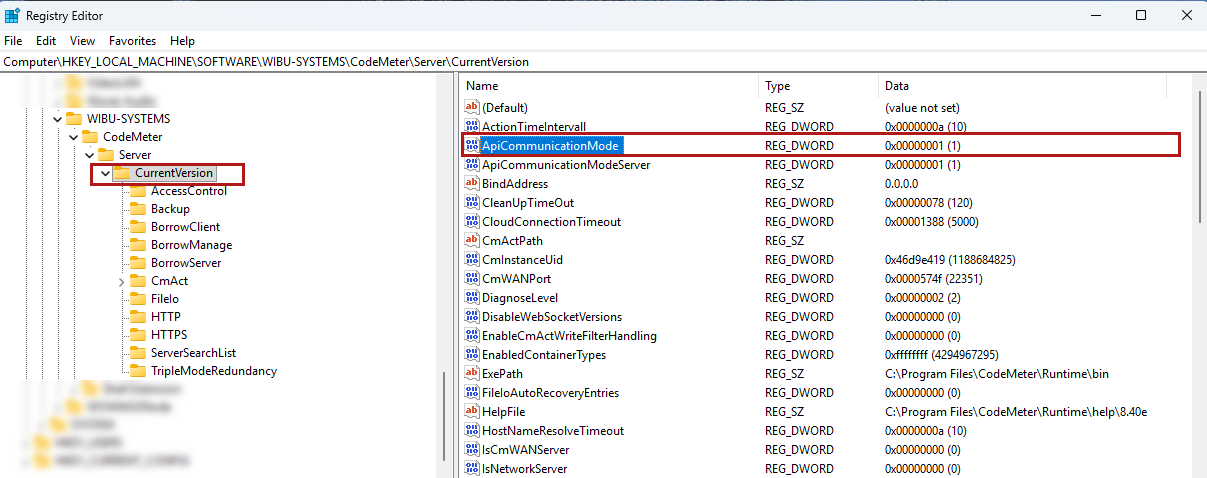
-
Change the value to "6" to allow only IPv4 and local use (no IPv6).
-
Next, restart the CodeMeter service on the server.
